

IPTV Reseller Panel Sub-Reseller Limits are the controls that decide what a reseller working under you can actually do: how many credits they hold, which packages they can sell, how many trials they can issue, whether they can create resellers of their own, and which customer actions they are allowed to take. Nearly all of them come from two places. Your provider sets the ceiling for your account, and you set each sub-reseller’s limits somewhere underneath that ceiling.
A sub-reseller can never spend credits you have not moved to them, and in most panels they cannot see an option your own account does not have. So when a sub-reseller reports that a button has vanished or a line refuses to create, the cause is usually a limit someone set on purpose rather than a fault on the server. Check their credit balance and permission settings from your own dashboard before raising a ticket with your provider, because that alone settles most cases within a couple of minutes.
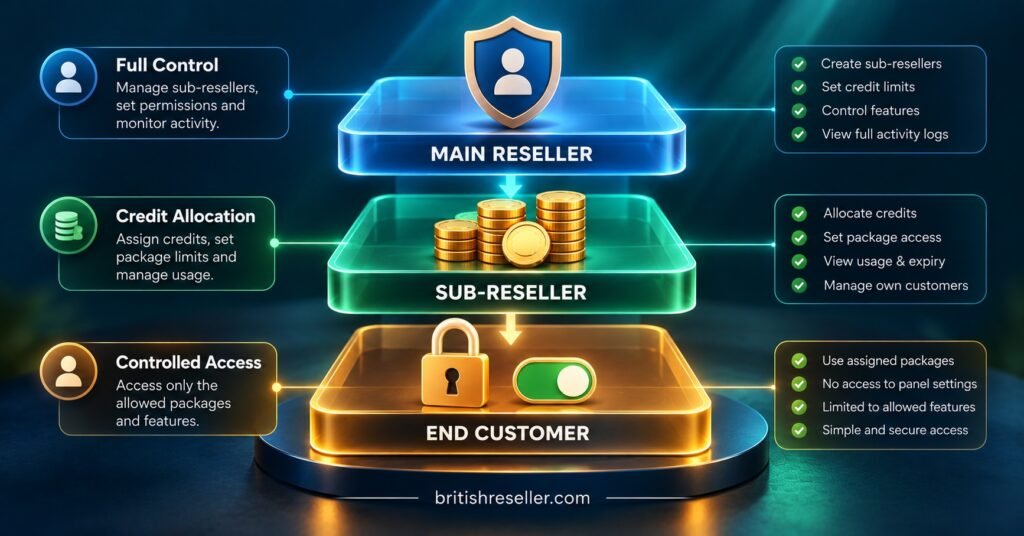
Three Layers Decide What a Sub-Reseller Can Do
It helps to picture sub-reseller limits as three stacked layers. Each one can only narrow what the layer above allows, never widen it.
The provider’s ceiling
Your provider decides whether your account is allowed to create sub-resellers at all. Some reseller accounts simply do not have the option, and no setting on your side will switch it on. The provider may also cap how many sub-reseller accounts you can hold, how many levels deep the structure can go, and which packages exist in your account in the first place. If a feature is missing from your own dashboard, it will be missing from every sub-reseller beneath you.
Your own settings
This is the layer you control and the one that causes most confusion. When you create a sub-reseller, the panel normally asks you to set their credit allocation, their permitted packages, their trial allowance and a set of action permissions. Many resellers accept the defaults during a quick setup, then forget what they chose. Weeks later the sub-reseller hits one of those defaults and assumes something is broken.
The panel software itself
Underneath both sits the panel software’s own logic. Credit transfers, line creation rules and permission groups behave the way the software was built to behave, and labels differ from one panel to another. One dashboard calls it “Sub-Resellers”, another “Resellers under me”, another “Member groups”. The principles are consistent even when the wording is not, which is why it is worth reading your own panel’s settings screen line by line rather than assuming it matches a guide written for different software. The reseller sub-accounts and panel access controls on British Reseller’s features page give a sense of how these controls are typically grouped.
The IPTV Reseller Panel Sub-Reseller Limits You Will Actually Meet
Not every panel offers every control below, and some name them differently. This is the practical set most IPTV panel resellers end up dealing with.
| Limit | Usually set by | What happens when it is reached |
|---|---|---|
| Credit balance | You, by transferring credits | Line creation and renewals stop until you top them up |
| Sub-reseller creation | Provider, then you | The “create reseller” option is hidden or greyed out |
| Number of sub-reseller accounts | Provider | New sub-reseller accounts cannot be created |
| Package access | You, within your own packages | The package does not appear in their creation menu |
| Trial allowance | You or provider | Trial button disabled or an allowance message appears |
| Line actions (extend, delete, edit) | You | The action is missing or returns a permission error |
| Connections per line | Package or provider | The sub-reseller cannot raise device limits on a line |
| Credit reclaim | Panel software | Unused credits may or may not be movable back to you |
Two rows deserve extra attention.
Credit reclaim is the one people discover too late. Some panels let you pull unused credits back from a sub-reseller; others treat a transfer as final. Your provider’s refund terms usually cover credits you bought from them, not credits you then passed down the chain, so a sub-reseller who walks away with an unused balance can become a straightforward loss. Find out how your panel behaves before you transfer anything large, ideally by moving a single credit across and trying to take it back.
Line actions matter because they decide who can undo what. A sub-reseller with permission to delete lines can remove a paying customer by mistake, and depending on the panel, a deleted line may not return its credit. Giving extend and create rights while withholding delete is a sensible default for anyone new.
Setting Up a Sub-Reseller Without Handing Over the Keys
The order below works on most dashboards, although menu names will vary.
- Confirm your own account allows sub-resellers. If the option is absent, ask your provider whether it can be enabled. Do not try to work around it by sharing your own login.
- Create a separate login for each sub-reseller. One account per person keeps the credit logs readable and lets you disable someone without affecting anyone else.
- Transfer a small opening balance. Enough for a week or two of realistic sales is plenty. You can always add more; recovering credits is harder.
- Restrict packages to what they will genuinely sell. A shorter menu also means fewer mistakes when they create lines under pressure.
- Switch off nested sub-reseller creation. Unless you have a clear reason, a sub-reseller should not be building their own network beneath yours, because you lose sight of who is selling what.
- Set a trial cap. Unlimited trials are easy to misuse and hard to audit later.
- Withhold delete and destructive edit rights at first. Create and extend are usually enough for day-to-day work.
- Record the settings you chose. A short note per sub-reseller (opening balance, packages, permissions, date) saves guesswork months later.
- Test as them. Ask the sub-reseller to create one real line while you watch the credit log on both sides move as expected.
Pro tip: Write down the exact permission screen you used the first time, with a phone photo or screenshot. When a second sub-reseller joins, you can copy the same settings instead of rebuilding them from memory.
A Worked Example: 300 Credits, Two Sub-Resellers
The figures below are purely illustrative and assume a panel where one credit buys one month on one line. Your provider’s credit rules may differ, so adjust the arithmetic to match.
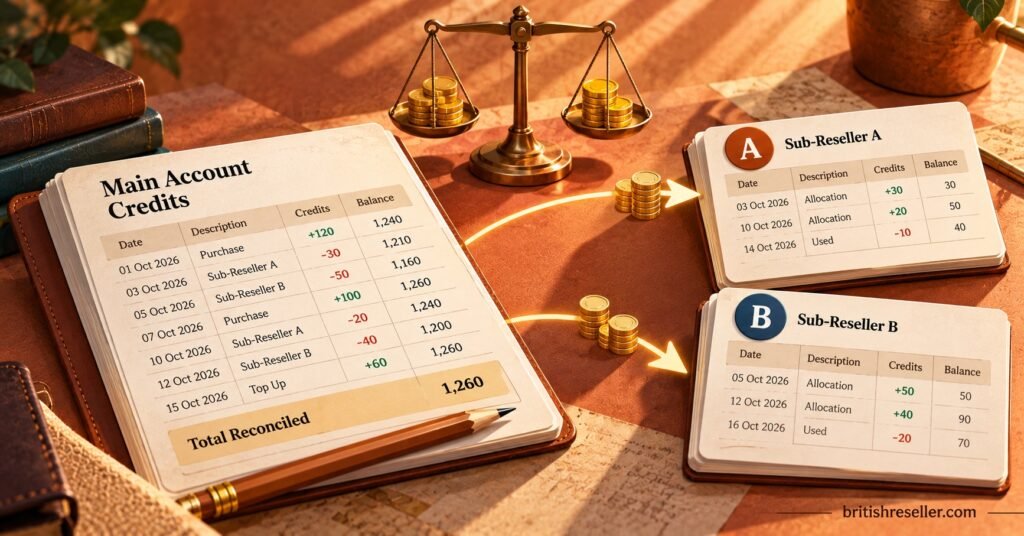
A IPTV panel reseller starts the month with 300 credits and brings on two sub-resellers, A and B. Their own credit log might read like this:
| Date | Movement | Parent balance after |
|---|---|---|
| 1st | Opening balance | 300 |
| 2nd | Transfer to Sub-Reseller A | 240 (60 sent) |
| 2nd | Transfer to Sub-Reseller B | 200 (40 sent) |
| 2nd to 30th | Parent creates and renews own lines | 132 (68 used) |
| 18th | Top-up to Sub-Reseller A | 112 (20 sent) |
Notice what the parent’s log does not tell you: how many of the 120 transferred credits were actually spent. For that you need each sub-reseller’s own log. At month end, Sub-Reseller A might show 80 received, 71 used on new lines and renewals, and 9 left. Sub-Reseller B might show 40 received, 14 used, and 26 sitting idle.
Those two records lead to very different decisions. A is selling steadily and needed a top-up mid-month, so a larger opening transfer next month is reasonable. B has used about a third of their allocation, which means 26 of your credits are tied up with someone who may not need them. If your panel allows reclaim, pulling some back is fair; if it does not, you simply hold off on B’s next transfer.
The habit that makes this work is reconciling both sides of every transfer each month, rather than watching only your own balance. British Reseller’s guide to IPTV reseller credit management goes further into forecasting and auditing credits, and if you need the same numbers to line up with your accounts, the practical bookkeeping guide for UK resellers covers how credit purchases and customer payments should agree.
When a Sub-Reseller Says “It Won’t Let Me”
Most support requests from sub-resellers describe a symptom, not a cause. Matching the symptom to the likely limit is quicker than troubleshooting from scratch.
“Not enough credits” when creating a line. Their balance is lower than the package cost. Check the sub-reseller’s own balance, not yours, and remember a longer package usually costs more credits than a single month.
A package is missing from their list. You have not assigned it to them, or your provider has removed it from your account. Check your own package list first; if it is missing there too, the change happened above you.
No option to create a reseller. Nested creation is switched off, either by you or by the provider. This is usually intentional and worth leaving as it is.
The trial button is greyed out. They have used their trial allowance for the period, or trials were never enabled for their account.
They cannot extend or delete a customer line. The relevant action permission is not granted. Decide whether they genuinely need it before switching it on, especially for deletion.
Their whole dashboard has stopped working. Look upwards. If your own reseller account has lapsed, been suspended or run into a provider-side issue, sub-reseller accounts beneath you can be affected too. This dependency is the clearest reminder that sub-resellers are only as stable as the account above them.
A customer gets a connection limit error. That limit normally belongs to the line’s package, not the sub-reseller’s permissions. The sub-reseller may not have the right to change it, and often should not.
Deciding How Much Freedom to Give
There is no correct universal setting. A sub-reseller who has sold reliably for six months and keeps tidy records can reasonably be given larger transfers and extend rights across all packages. Someone in their first fortnight should be on a short leash, not because they are untrustworthy, but because mistakes are cheaper while balances are small.
Raise limits on evidence. A steady credit log, low complaint levels and renewals handled on time are good reasons to widen permissions. A sudden request for a large balance or full delete rights, with no change in sales, is a reason to ask questions first.
Plan the exit before you need it. If a sub-reseller stops working with you, the steps are usually to disable their login, reclaim any credits the panel lets you recover, and decide what happens to the customer lines they created. Those customers sit inside your account structure, so their service and support become your problem whether or not the sub-reseller stays in touch. The same thinking applies if you ever move providers, which British Reseller’s article on transferring lines and sub-reseller accounts during a panel migration covers in detail.
Finally, limits control behaviour inside a dashboard; they say nothing about whether the service being sold is properly licensed. A sub-reseller operates under your account, so it is worth making sure everyone in your chain understands that IPTV is a delivery technology and that legitimate selling depends on the content provider holding the right distribution rights.
A Reusable Sub-Reseller Limits Checklist
- Provider has confirmed sub-reseller creation is enabled on your account
- Each sub-reseller has a unique login, never a shared one
- Opening credit transfer covers roughly two weeks of realistic sales
- Credit reclaim behaviour tested with a single credit before larger transfers
- Package access limited to what the sub-reseller actually sells
- Nested sub-reseller creation switched off unless deliberately approved
- Trial allowance capped and reviewed monthly
- Delete rights withheld until a clear track record exists
- Settings recorded with date, balance and permissions for each account
- Both sides of every credit transfer reconciled at month end
- Exit steps agreed in advance: disable login, reclaim credits, take over customer lines
Questions Resellers Ask About Sub-Reseller Accounts
Can a sub-reseller ever hold more credits than I do?
No. Every credit a sub-reseller holds was transferred from your balance, so their total can never exceed what you moved to them. Your own balance may still look low while theirs looks healthy, which is why both logs need checking.
Do my customers’ lines stop if a sub-reseller’s account is disabled?
That depends on the panel. In many setups, lines already created keep running until their expiry date even after the sub-reseller’s login is disabled, but confirm this with your provider before relying on it.
Can I move credits back from a sub-reseller?
Some panels support reclaiming unused credits and some do not. Test with one credit when you set up your first sub-reseller, so the answer is known before any real money is involved.
Does API access follow the same limits?
API access is normally tied to an account’s permissions, so a sub-reseller with API rights can do through code whatever they could do through the dashboard. Unless a sub-reseller has a genuine integration need, leave API access switched off for their account.
How often should sub-reseller limits be reviewed?
Monthly works well for most operations, alongside your credit reconciliation. Review sooner if a sub-reseller’s sales pattern changes sharply.
Getting Your Sub-Reseller Structure Right
IPTV Reseller Panel Sub-Reseller Limits are less about restriction than about keeping visibility as your operation grows. The provider sets the outer boundary, you decide what each sub-reseller can do within it, and the credit logs on both sides show whether those choices are working. Start every new sub-reseller small, test credit reclaim before you rely on it, and reconcile transfers monthly. If anything about your own account’s limits is unclear, the quickest next step is to ask your provider exactly which sub-reseller controls your panel supports, then set yours deliberately rather than by default.