

If you want to watch live football on IPTV, the short answer is that IPTV delivers television channels and sports coverage over the internet rather than through a satellite dish or cable box, and whether it is legitimate depends entirely on whether the provider holds proper rights to distribute that content. A good IPTV service works on almost any device, updates its channel list regularly, and is upfront about what you are paying for.
A poor one buffers constantly, disappears without notice, or turns out to be redistributing content it never had permission to carry. The rest of this guide covers how to tell the difference, what a fair setup looks like, and what resellers and sub-resellers need to think about before offering this kind of service to customers.
What Watching Live Football on IPTV Actually Involves
IPTV, or Internet Protocol Television, sends video as data over a broadband or mobile connection instead of through a traditional broadcast signal. When you watch live football on IPTV, your device is essentially streaming a video feed the same way it would stream anything else online, just packaged with a channel guide and live scheduling so it feels closer to normal TV.
This matters for football specifically because sport is time-sensitive. A delayed goal notification or a stream that drops during a key moment is far more noticeable than buffering on a film you can pause. That is why connection quality, server capacity during peak kick-off times, and app stability tend to separate a workable IPTV subscription UK service from a frustrating one.
None of this changes the underlying legal question. IPTV is a delivery method, not a licence. A channel being available through an app does not automatically mean the operator has the right to broadcast it, and that responsibility sits with the provider, not with the underlying technology.
Why Legality Depends on the Provider, Not the Technology
Football broadcasting rights are sold on a country-by-country, sometimes region-by-region basis, and those rights are expensive precisely because they are exclusive. A provider that has not purchased distribution rights for a fixture is not licensed to stream it, regardless of how professional its app or website looks.
This is where a lot of confusion happens. People reasonably assume that a slick interface, a working payment page, or a UK IPTV reseller offering support through WhatsApp implies everything behind it is above board. None of those things are proof of licensing. A well-built storefront and a properly licensed content feed are two separate matters, and only the provider itself can speak to the second one.
Pro tip: Ask a provider directly which rights holder or distribution agreement covers the football content they advertise. A provider that answers clearly is different from one that changes the subject.
If a provider cannot or will not explain where its content rights come from, that is a more reliable signal than anything about app quality or price.
What to Check Before Choosing an IPTV Service
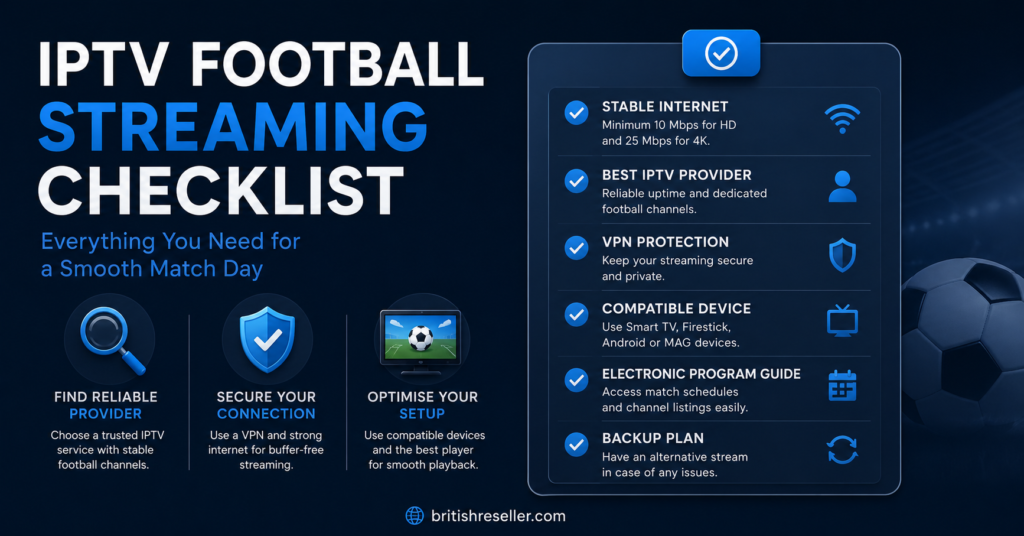
Before committing to any subscription built around watching live football on IPTV, a few practical checks go a long way toward avoiding disappointment later.
Start with device compatibility. Confirm the service actually supports the hardware you already own — a Firestick, an Android box, a smart TV app, or a mobile device — rather than assuming it will work everywhere. Then look at how the provider communicates. Clear terms, a visible refund policy, and a real support channel are basic signs of a business that expects to still be operating in six months.
Pricing clarity matters too. A provider that lists exactly what a package includes, without vague wording like “unlimited everything,” is easier to hold accountable if something does not match what was promised.
| Question to Ask | Why It Matters |
|---|---|
| What devices are supported? | Avoids buying a subscription that will not run on your setup |
| Is there a refund or trial period? | Gives you a way out if the service does not perform |
| How is support contacted? | Indicates whether help exists when something breaks |
| Where do content rights come from? | The clearest indicator of legitimate operation |
Common Reasons Football Streams Buffer or Drop
Even with a legitimate IPTV panel UK service, football streaming can run into technical hiccups, and it helps to understand what usually causes them rather than assuming the worst provider possible.
| Problem | Likely Reason | Next Action |
|---|---|---|
| Stream freezes during busy matches | Server load during peak kick-off times | Try an alternate server if the app offers one |
| Picture quality drops suddenly | Local broadband congestion | Check other devices on the same network |
| App crashes on start-up | Outdated app version | Update the app or reinstall it |
| Stream works on Wi-Fi but not mobile data | Mobile network throttling or low signal | Test with a stronger signal or different network |
Pro tip: Run a basic speed test on your own connection before assuming the problem is on the provider’s end. A large share of streaming complaints trace back to home network congestion rather than the service itself.
Subscriber Guidance: What a Fair Setup Looks Like
For anyone signing up purely to watch football at home, a few things separate a fair subscription from a risky one. Look for transparent pricing with no hidden renewal terms, a stated device limit so you know how many screens are covered, and a support channel that responds within a reasonable window rather than going silent after payment.
It is also worth checking how the provider handles refunds. A business confident in its own reliability usually states its refund terms plainly rather than burying them or avoiding the topic. If a IPTV reseller Panel provider such as britishseller.co.uk publishes a clear refund policy and support contact, that is a reasonable baseline to compare other providers against — not proof that any single provider is the right choice, since the same checks should be applied to every option you consider.
Reseller Guidance: Offering Football-Focused IPTV Packages
For anyone running an IPTV reseller business rather than just watching football personally, the considerations shift toward operations. A reseller dashboard should give clear visibility into which customer lines are active, how credits are being consumed, and when subscriptions are due for renewal, since football-heavy packages tend to see higher usage during major fixture periods.
Customer expectations also rise around football content specifically, because subscribers notice service issues in real time rather than after the fact. Having a documented process for handling complaints, escalating technical issues, and communicating planned maintenance windows reduces churn more effectively than simply offering a lower price.
Resellers exploring panel features and dashboard tools should look specifically at how credit tracking, trial generation, and bulk line management are handled, since these are the tools used daily once a customer base grows.
Pro tip: Keep a simple log of recurring customer complaints by category. Patterns in that log — repeated buffering reports during specific windows, for example — tell you more about where to focus support effort than anecdotal feedback alone.
Sub-Reseller Guidance: Working Within Someone Else’s Panel
Sub-resellers operate a layer further from the source, buying credits from a parent reseller rather than directly from a provider. That arrangement affects margins, since pricing is typically set by the parent account, and it affects support responsibility, since a sub-reseller often has to manage customer expectations without full backend access to diagnose issues themselves.
Before taking on a sub-reseller role built around football-focused packages, it is worth clarifying in writing what happens if the parent reseller’s own supply is interrupted, since that risk sits above the sub-reseller and outside their direct control.
Setting Up an IPTV Service for the First Time
Getting started with an IPTV subscription UK service typically follows a similar pattern regardless of provider, though the exact steps vary slightly between apps.
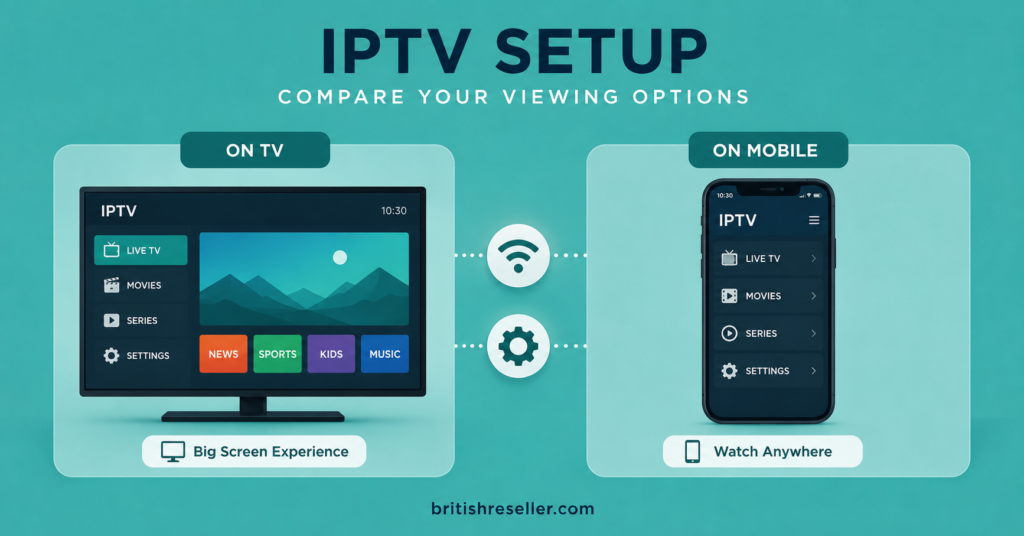
Basic setup usually starts with installing the provider’s app or a compatible player on your device, then entering the account details or activation code supplied after payment. Better setup goes further: checking the electronic programme guide loads correctly, confirming catch-up or replay windows work as described, and testing playback on your actual viewing device rather than assuming it will behave the same as a demo.
| Basic Setup | Better Setup |
|---|---|
| Install the app and enter login details | Also confirm the EPG updates correctly |
| Play a channel to confirm it works | Test playback across all devices you own |
| Assume the trial covers everything | Compare trial access against the paid package |
Common Mistakes People Make When Choosing a Provider
A few patterns come up repeatedly among people unhappy with an IPTV purchase. Paying for a long-term package before testing a trial is one of the most common, since it removes any real chance to evaluate reliability before committing money. Ignoring device compatibility until after payment is another, particularly among people assuming every app works identically across Firestick, Android, and smart TV platforms.
Trusting a provider purely because a friend recommended it, without checking device support or refund terms yourself, is another frequent misstep — what worked for someone else’s setup does not guarantee it fits yours.
Frequently Asked Questions
Is it legal to watch live football on IPTV?
IPTV itself is a legitimate streaming technology. Whether a specific football stream is legal depends on whether the provider holds the rights to distribute that content, which varies provider by provider and cannot be assumed from app quality alone.
Why does my football stream buffer more than other content?
Live sport tends to draw heavier simultaneous traffic during kick-off periods, which can strain server capacity more than on-demand content. Home network congestion is also a common contributing factor.
What devices work with IPTV subscription UK services?
Most services support Firestick, Android TV boxes, smart TVs, iOS and Android phones, and some MAG-based devices, though exact compatibility varies by provider and should be confirmed before purchase.
How do I know if an IPTV reseller panel is worth using?
Look at dashboard usability, how clearly credits and lines are tracked, response times from support, and whether trial generation and sub-reseller tools are included, rather than judging on price alone.
Do IPTV providers offer refunds if the service does not work?
Refund policies vary significantly between providers. Check the stated terms before purchasing rather than assuming a standard policy applies across the industry.
Can I switch IPTV providers if I am unhappy with one?
Yes, and most subscriptions are not tied to long-term contracts, though some IPTV reseller panel setups offer migration assistance if you are moving an existing customer base rather than a single account.
Conclusion
Watching live football on IPTV comes down to picking a provider that is transparent about pricing, device support, and where its content rights actually come from, rather than judging purely on app polish or price. For subscribers, that means checking refund terms and device compatibility before paying. For resellers and sub-resellers, it means having dashboard visibility and a clear support process in place before football-heavy demand puts real pressure on the system. None of this guarantees a perfect experience, but it substantially reduces the chance of an unpleasant surprise.
Subscriber Checklist
- Confirm device compatibility before paying
- Check for a stated refund or trial period
- Ask how content rights are sourced
- Test playback during a live match if a trial is available
- Note the support contact method and expected response time
Reseller Checklist
- Review dashboard visibility for active lines and credit usage
- Confirm bulk management tools are available for peak periods
- Document a process for handling buffering or outage complaints
- Check that trial generation works without draining paid credits
- Compare renewal and refund terms before offering packages to customers